
BDD framworks like Cucumber are nice because in theory all tests could be defined by product owner using Gherkin. In practice this will never happen :-(
JGiven instead has a different approach. You have to write the tests and the scenarios with all the steps are created automatically. It is also possible to create a report page.
JGiven concepts
JGiven uses the Given/When/Then concept and provides the necessary implementations to reach this goal.
The framwork offer methods like given(), when() and then() and also supports a fluent interface. Everything combined will create readable tests.
All code related can be found on my github project
@Test
public void brew_coffee() throws Exception {
    given().have_a_coffee_machine()
        .and().add_coffee_beans("Nicaragua")
        .and().add_hot_water();

    when().i_brew_coffee();

    then().the_coffee_tastes_good();
}
It is possible to define all the steps in seperate classes or for small tests also as a nested class. I will explain it later.
This created HTML report for the test
Brew coffee
  Given have a coffee machine
    And add coffee beans Nicaragua
    And add hot water
   When i brew coffee
   Then the coffee tastes good
Add JGiven dependency
To use JGiven you have add the maven dependency.
<dependency>
    <groupId>com.tngtech.jgiven</groupId>
    <artifactId>jgiven-junit</artifactId>
    <version>0.11.4</version>
    <scope>test</scope>
</dependency>
Nested steps
Nested steps can be used for small tests classes where it does not make sense to create a bunch of classes for each test stage.
The test itself has to extend the SimpleScenarioTest<NestedCoffeeMachineTest.NestedStage> and the corresponding nested class has to extend Stage<NestedStage>.
After that all methods can be implemented in the nested stage class. The class itself contains all members needed to execute the steps.
Code can be found on github.
public NestedStage add_coffee_beans(String beans) {
  coffeeMachine.addBeans(beans);

  return self();
}
Steps for each stage
The second and probably preferred solution is to create one class for each stage. In given stage, all preparations are done. The action will be triggered in when stage (this stage will be quite small, maybe only one or two methods). All assertions can be done in then stage. Sounds like SRP to me.
Code can be found on github.
For this the test has to extend the ScenarioTest class.
public class CoffeMachineTest extends ScenarioTest<GivenCoffeeMachine, WhenCoffeeMachine, ThenCoffeeMachine> {
  ...
}
All stage classes has to extend the Stage class.
public class GivenCoffeeMachine extends Stage<GivenCoffeeMachine> {
  ...
}
Passing objects from one stage to another
Because there is one class for each stage and all stages are independent from each other, the objects has to be passed to each stage. Luckily JGiven is also able to handle this. The two annotation @ExpectedScenarioState and @ProvidedScenarioState indicate if the state is expected (then stage) or provided by the stage (given and when stage).
public class GivenCoffeeMachine extends Stage<GivenCoffeeMachine> {

  @ProvidedScenarioState
  CoffeeMachine coffeeMachine;

  ...
}
public class WhenCoffeeMachine extends Stage<WhenCoffeeMachine> {

  @ProvidedScenarioState
  CoffeeMachine coffeeMachine

  ...
}
public class ThenCoffeeMachine extends Stage<ThenCoffeeMachine> {

  @ExpectedScenarioState
  CoffeeMachine coffeeMachine;

  ...
}
Reporting
By default JGiven will create plain text output on console which can be disabled using system proerty jgiven.report.text=false. JGiven also creates a JSON output which can be used by Jenkins plugin.
HTML report
It is also possible to automatically create a HTMl report. The created report will be localted in folder target/jgiven-reports/html
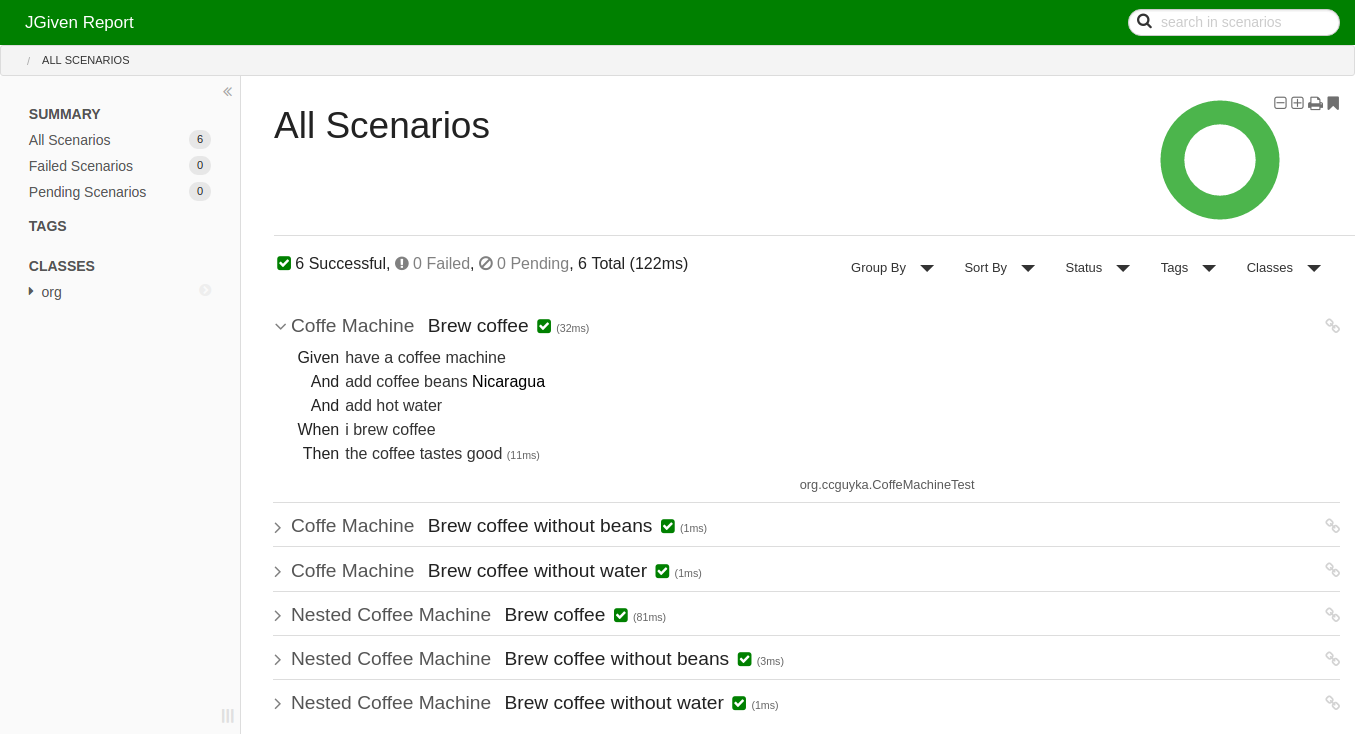
The HTML report has to be enabled in pom.xml.
<build>
  <plugins>
    <plugin>
      <groupId>com.tngtech.jgiven</groupId>
      <artifactId>jgiven-maven-plugin</artifactId>
      <version>${jgiven.version}</version>
      <executions>
        <execution>
          <goals>
            <goal>report</goal>
          </goals>
        </execution>
      </executions>
      <configuration>
        <format>html</format>
      </configuration>
    </plugin>
  </plugins>
</build>
Conclusion
This tool is quite good to solve some common problems as e.g. readable tests or single responsibility principle.
Open questions for the future
This first part of JGiven post was created to get a first introduction into ist. But for further usage in a real life environment there are still some open quiestions.
- how to use mocking frameworks?
- how to use paremeterized tests?
- how to create UI tests with Selenium?
Hopefully i wil lfind time to answer all these question.
